
PsiTableCube()
PsiTableCube() defines a cube over a sparse table representation with an arbitrary order of records.
A sparse cube is defined by missing records for PsiTableCube(). If Use Sparse Cubes = False, on the Platform tab of the Solver Task Pane, and you have defined a cube using PsiTableCube(), elements missing from the cube will be considered equal to 0. If Use Sparse Cubes = True, you have defined a cube using PsiTableCube() with missing records, and the percentage of elements missing or empty is more than 30% of the total possible cube elements, those missing elements or records will not be included in the model.
As with PsiCube, the maximum number of elements in a cube created by PsiTableCube or by formula evaluation is 1,000,000. The maximum number of index columns or dimensions is 8.
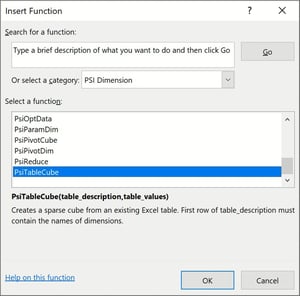
To create a sparse cube using PsiTableCube(), click Formula on the Excel Ribbon, select Psi Dimension as the category, then select PsiTableCube from the list of PSI Cube functions, then click OK.
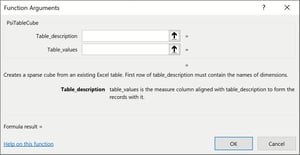
Table_description: Enter an Excel range containing the table headings. These headings may be entered in an arbitrary order. You may enter a maximum of eight descriptive (or index) columns.
Table_values: Enter an Excel range containing the table values. Only one value column is supported.
If given the following table,
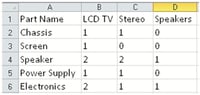
This table can be rewritten as:
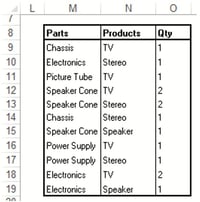
Using this example, our arguments for PsiCubeTable() would be:
Table_description: M8:N19
Table_values: O8:O19
Function Signatures
The signature provided for this function is:
=PsiTableCube(table_description, table_values)
PsiTableCube() defines a cube over a sparse table representation with an arbitrary order of records. The missing combinations are assumed to have values equal to 0.
table_description: Enter a range of cells containing string values that describe the numeric value column, i.e. the part and product names in the “Parts” and “Products” columns.
range_with_values: The is a range of cells on the Excel worksheet containing numeric values, i.e. the values listed in the “Qty” column.
Examples
= PsiTableCube(M8:N19, O8:O19) where cells M8:N19 are cells containing string names such as "Products" and "Parts" and cells O8:O19 contain numeric values.